
MECCHA CHAMELEON Meeting room — Workshop Map Guide
acid_fox’s modern interior Workshop stage for MECCHA CHAMELEON: subscribe before the lobby, test privately, and read the room for desk edges, glass panels, and chair-scale silhouettes.
At a glance
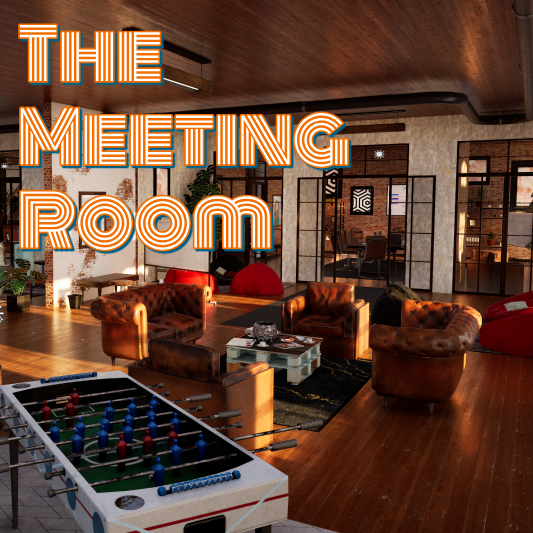
Meeting room is a popular community interior by acid_fox — a modern, realistic office-style stage built for MECCHA CHAMELEON. Subscribe in Steam, wait for the download, run one private test, then share the Workshop link so every player loads the same file before you queue.
Workshop facts
| Detail | Info |
|---|---|
| Workshop item | Meeting room (ID 3745249764) |
| Creator | acid_fox |
| Posted | 15 June 2026 |
| File size | ~139 MB — allow time to download before hosting |
| Style | Modern realistic interior / meeting-office layout |
Creator note from the listing: first map for MECCHA CHAMELEON, focused on a clean indoor look. Treat discussion threads about “invincible spots” as a reminder to retest routes after patches — not as permanent meta.
Before you host this map
- Subscribe: open the Workshop item and subscribe; restart the game if the map does not appear.
- Sync the lobby: every player must subscribe before joining — mismatched subscriptions cause load failures.
- Private test: one short round on an official map, then one on Meeting room, before inviting a full group.
- Share the link: paste the Workshop URL in chat so late joiners subscribe to the same item.
Full multiplayer setup habits: Online guide.
Scene reading on an office interior
Meeting room rewards the same core loop as official indoor maps — Spot → Pose → Paint — but the props are desks, chairs, glass partitions, and flat wall panels. Pick one material family per hide instead of painting across unrelated surfaces.
| Surface | Hider focus | Seeker check |
|---|---|---|
| Desk or table edge | Match height first; crouch until the head stays below the tabletop line | Compare top edges — one shape with the wrong thickness |
| Chair or low seating | Compact pose; sample upholstery tone beside the final position | Look for an extra vertical line in a row of similar chairs |
| Glass or bright panel | Two-tone Spoid from the nearest opaque surface, not the reflection | Check value contrast — near-correct colour can still read as a dark cutout |
| Flat wall / screen | Flatten silhouette; continue one panel direction with simple lit + shadow paint | Scan for a human-width interruption in an otherwise even field |
Three quick lobby drills
- Load check: host only — confirm the map name appears in lobby settings before inviting friends.
- One-material round: each Hider picks one desk, wall, or chair cluster and uses at most two Spoid tones.
- Reverse sweep: Seekers finish with a second pass from the opposite corridor angle.