
MECCHA CHAMELEON Workshop Maps
Steam Workshop listings with practical hosting checklists for community stages. We link to each item and focus on fair setup instead of inventing permanent “best spots.” Official-map facts are in the Wiki map notes.
Official maps and Workshop stages serve different jobs
Official maps ship with the game and provide the most stable baseline for learning controls, role rules, and repeatable scene-reading habits. Workshop stages are community items distributed through Steam. They can offer new layouts and materials, but every player must have the correct item available and the host must verify that the stage behaves properly with the current game build. A Workshop listing is therefore not a promise that a map is balanced for every group or unchanged after every update.
Use the official Wiki map notes when you need a reference tied to the built-in roster. Use this hub when a group deliberately wants a community stage and accepts a short setup and private-test process. The guides below preserve creator attribution and link to the relevant Steam Workshop item instead of repackaging downloads.
Subscribe and load a community stage safely
- Open the original listing. Follow the Steam link from the map guide and confirm the item name and creator before subscribing.
- Subscribe before the lobby forms. Give Steam time to download the item; do not ask a full group to wait while each person searches for a similar title.
- Restart when necessary. If the map does not appear in selection, close and reopen the game after Steam finishes the download.
- Confirm the host can select it. The host should see the exact map in the lobby before sending final invites.
- Run a small private test. Load the stage with one or two collaborators and walk through spawn, movement, hiding, searching, and round completion.
- Share the source link. Keep the Workshop URL in the group chat so a missing or late player subscribes to the same item.
Do not download map files from an unrelated mirror when Steam Workshop provides the item. The subscription workflow gives the creator attribution, item identifier, update information, and a common source for the room. If Steam or the game reports a mismatch, solve that mismatch before beginning a scored or competitive session.
Private host preflight checklist
| Test | What the host observes | Reason to pause public hosting |
|---|---|---|
| Load and spawn | Every tester enters the same stage and receives a usable starting position | A player remains on a loading screen, falls, clips, or spawns outside the playable route |
| Role loop | Preparation, hunt, tagging, timer, and results complete normally | The round cannot advance or finish under the selected mode |
| Movement | Main rooms and connectors can be traversed without unintended traps | Normal routes strand a role or require unexplained workarounds |
| Sightlines | Seekers can inspect major areas from more than one deliberate angle | A location is invisible because of broken geometry rather than camouflage |
| Lighting | Players can distinguish surfaces and silhouettes using normal settings | A required area is unreadable or behaves differently for testers |
| Group scale | The route still gives both roles meaningful decisions with the planned room size | The test suggests overcrowding, excessive empty search time, or unreliable spawns |
This checklist records observations; it does not create a universal player-count recommendation. If a guide does not document verified capacity, start with a smaller private room, change one setting at a time, and let the host describe the test result before inviting more players.
How to compare the listed stages
Meeting Room is presented as a modern office interior, Viking Dining as a wood-and-stone dining environment, and Police Station as a department interior with desks, cabinets, corridors, and Xray-capable prop materials. Those descriptions suggest different scene-reading exercises, not a ranking. Read each detail page for its creator, source link, material notes, and test prompts, then choose the environment that matches the skill your group wants to observe.
- For repeated office shapes and clean furniture lines, review Meeting Room.
- For timber, stone, barrels, and warmer material families, review Viking Dining.
- For corridors, tiled surfaces, cabinets, and transparent-material checks, review Police Station.
Fair rules for the first hosted session
Tell players that the map is community-made, share the source, and explain what the private test confirmed. Avoid presenting an untested corner, collision edge, or loading quirk as a secret competitive tactic. For the first full room, keep the selected mode familiar and avoid changing timer, map, group size, and house rules simultaneously. After each round, ask whether a result came from readable camouflage and searching or from a technical problem.
Troubleshooting missing maps and mismatches
- Map missing from selection: confirm subscription, wait for Steam download completion, then restart the game.
- One player cannot join: compare the exact Workshop URL and item ID, then verify the player's download state.
- Different behavior between players: record game version, map update date, mode, and the step that produced the difference.
- Round does not finish: stop the session, reproduce with fewer players, and return to an official map if the loop remains unreliable.
- Balance feels unclear: do not publish a permanent verdict after one round; repeat the same setup and change only group size or one room setting.
Workshop hosting FAQ
Does every player need the map? Plan the room as if every participant must subscribe to the same Steam Workshop item before joining.
Is a Workshop stage an official map? No. Community stages remain separate from the built-in map notes even when the game officially supports Workshop tools.
Can this hub guarantee a fair player count? No. Use the private test checklist and document what your current group and build actually show.
Community Workshop stages
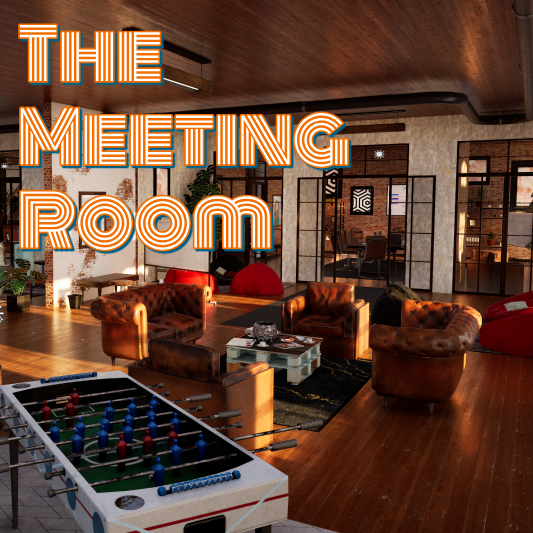
MECCHA CHAMELEON Meeting room — Workshop Map Guide
acid_fox’s modern interior Workshop stage for MECCHA CHAMELEON: subscribe before the lobby, test privately, and read the room for desk edges, glass panels, and chair-scale silhouettes.
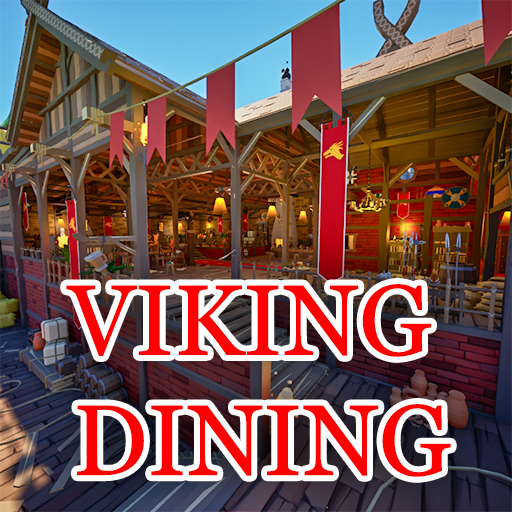
MECCHA CHAMELEON Viking Dining — Workshop Map Guide
RareKiwi’s viking tavern Workshop stage for MECCHA CHAMELEON: wood-and-stone interiors, Xray prop materials, subscribe-and-test hosting, and scene-reading tips for barrel, beam, and hearth backdrops.
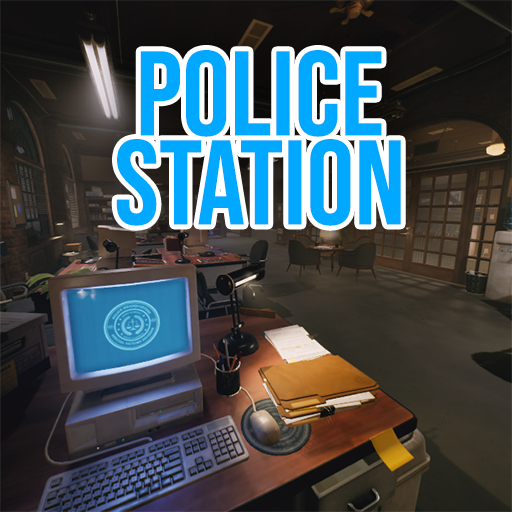
MECCHA CHAMELEON Police Station — Workshop Map Guide
RareKiwi’s police department Workshop stage for MECCHA CHAMELEON: fluorescent interiors, filing cabinets and desk rows, Xray prop materials, and scene-reading tips for lobby hosting.