
MECCHA CHAMELEON Police Station — Workshop Map Guide
RareKiwi’s police department Workshop stage for MECCHA CHAMELEON: fluorescent interiors, filing cabinets and desk rows, Xray prop materials, and scene-reading tips for lobby hosting.
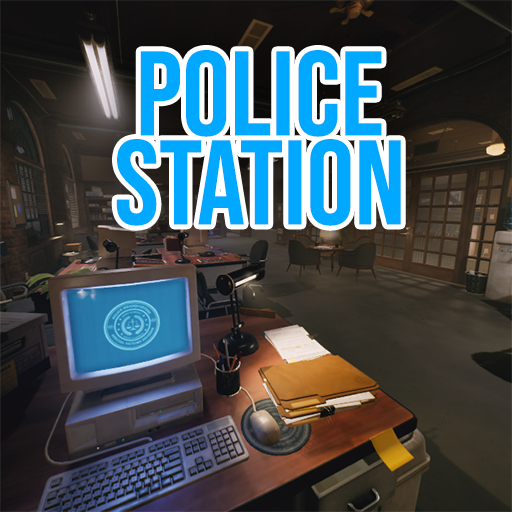
At a glance
Police Station by RareKiwi is a police-department interior built from 1996 Police Headquarters assets on Fab. The listing supports prop Xray materials — useful for glass partitions and thin props, but still hide against opaque frames. Subscribe, download, private-test, then share the Workshop link before the lobby starts.
Workshop facts
| Detail | Info |
|---|---|
| Workshop item | Police Station (ID 3747815568) |
| Creator | RareKiwi |
| Posted | 19 June 2026 |
| Last updated | 23 June 2026 |
| File size | ~45 MB |
| Style | Police HQ interior with Xray-capable props |
Department maps mix long corridors, desk rows, and flat wall panels under even lighting — strong for practising silhouette control, unforgiving if you pick a spot with no local shadow to sample.
Before you host this map
- Subscribe: open the Workshop item and subscribe; restart if Police Station is missing from map select.
- Sync the lobby: every player must subscribe before joining.
- Private test: one official-map round, then one Police Station test, before a full group.
- Share the link: paste the Workshop URL for late joiners.
Full multiplayer setup habits: Online guide.
Scene reading in a police interior
Use Spot → Pose → Paint on one material family — desk edge, tile run, or cabinet row. Fluorescent lighting makes single flat colours obvious; Spoid both a lit plane and a nearby shadow on the same surface.
| Surface | Hider focus | Seeker check |
|---|---|---|
| Desk or counter row | Crouch to the tabletop line; match width, not every object on the desk | Scan for one block taller or wider than its neighbours |
| Filing cabinet / locker wall | Flatten against the face; continue vertical panel rhythm with two tones only | Look for a gap or extra divider in a repeating column |
| Floor tile or corridor seam | Align pose with the seam direction; sample shadow from the final tile | Check for a blob that ignores the grout line |
| Glass / Xray partition | Hide on the opaque frame or wall beside the glass, not floating in the pane | Compare edges where a body should be occluded but reads as a dark cutout |
Three quick lobby drills
- Load check: host confirms Police Station in lobby settings before invites.
- Corridor round: Hiders pick one wall segment; Seekers sweep perimeter first, centre last.
- Reverse angle: finish the hunt from the opposite end of the main hallway.
Private test procedure
Use a small private room before treating Police Station as ready for a regular group. First, confirm every tester subscribed to Workshop item 3747815568 and can see the same map name. Load the stage and check that each player reaches a valid spawn. Walk the ordinary room and corridor connections as both roles. Then run one complete preparation, hunt, tag, timer, and results cycle without adding unusual house rules.
Record the game version, Workshop update date, selected mode, group size, and any failure. If a player loads late, clips into geometry, sees different materials, or cannot complete the role loop, stop and reproduce the problem with fewer variables. A private test is successful when the mechanics complete consistently, not when a single dramatic hiding place wins once.
Host configuration and group-scale prompts
The Workshop listing and current source notes do not establish one universal recommended player count for this stage. Start below the room's maximum, keep the mode familiar, and observe whether players distribute across the interior or crowd the same corridor. Add players only after the role loop and main connectors remain usable. Do not change map, mode, timer, and group size together because the group will not know which change affected the result.
| Observation | Question for the host | Next test |
|---|---|---|
| Most players meet in one corridor | Are alternative room connections visible and usable? | Repeat with the same group after explaining only the connectors |
| Search ends immediately | Did the group reuse obvious desk or cabinet positions? | Keep settings and require different material families |
| Search runs without meaningful contact | Is the route too spread out for the tested group? | Change only group size, then compare the same sweep |
| A hiding position cannot be inspected | Is camouflage responsible, or is geometry blocking a valid check? | Revisit from both sides and remove the position if geometry is broken |
Hider backdrop and silhouette prompts
Treat desks, cabinet faces, tile seams, frames, and corridor walls as material prompts rather than guaranteed hiding spots. Before painting, ask whether the selected pose continues a nearby horizontal or vertical line. Sample a lit and shaded area from the same material. Check the body from the open corridor or doorway instead of judging only from a close camera. Transparent or Xray-capable materials require special caution: test the opaque frame and adjoining surface rather than assuming a glass pane conceals the body.
- Desk row: compare the top line and width of the posed body with repeated furniture.
- Cabinet face: continue the panel rhythm without adding an unexplained divider or bulge.
- Tile seam: align the long direction of the pose and preserve the visible grout pattern.
- Door or partition frame: test the disguise from both rooms before trusting a thin edge.
Seeker corridor and room sweep prompts
A Police Station test should include a repeatable sweep rather than random firing. Follow one perimeter through the connected rooms, inspect repeated desks and cabinets, then return through the main corridor from the other direction. The return angle matters because a silhouette that merges with a frame from one doorway may project into open space from the other. Pause where lighting changes across a threshold and compare the expected shadow with the candidate shape.
When a Seeker finds someone, name the visual clue before moving on: an extra vertical panel, broken tile seam, wrong surface finish, human-scale curve, movement, or an unexpected dark cutout through transparent material. That note helps the Hider improve and tells the host whether the stage supported a readable search.
Failure symptoms and fixes
- Map absent: verify the exact item subscription, wait for Steam, restart, and check selection again.
- Player mismatch: compare item IDs and download state instead of sending a third-party file.
- Broken spawn or route: record the location and current versions, then stop using that setup for a full lobby.
- Unclear transparent material: reproduce from both role cameras and avoid presenting it as a fair hiding technique until verified.
- Round-state failure: return to a simple mode with fewer players and test the complete loop again.
Post-session review
After the final test, ask four questions. Did every player load the same stage? Did each role receive a usable spawn and complete the round? Were successful disguises readable from at least one legitimate approach when the Seeker used a systematic route? Did any outcome depend on clipping, missing assets, or a material that behaved inconsistently? Keep the stage in rotation only when the group can separate camouflage skill from technical failure, and repeat the test after relevant game or Workshop updates.